
Support: Check If Your Computer Is Overheating
This article applies to both laptop and desktop computers.
The Cooler The Computer Runs = The Faster It Runs!
This is a basic principal of computer maintenance. The hotter the cores get, the slower the computer will become. With laptop computers it is often easier to notice that your computer is overheating. Perhaps the power supply is becoming very hot or there is hot air coming from the fan vent.
Desktop computers can be less obvious as they often sit for years in the same place without being moved.
I have posted some pictures of how easily the fan vents in laptops can get choked up with dust over time.
[Best_Wordpress_Gallery gallery_type=”thumbnails” theme_id=”1″ gallery_id=”4″ sort_by=”order” order_by=”asc” show_search_box=”0″ search_box_width=”180″ image_column_number=”5″ images_per_page=”30″ image_title=”none” image_enable_page=”1″ thumb_width=”360″ thumb_height=”180″ thumb_click_action=”undefined” thumb_link_target=”undefined” popup_fullscreen=”0″ popup_autoplay=”0″ popup_width=”800″ popup_height=”500″ popup_effect=”fade” popup_interval=”5″ popup_enable_filmstrip=”1″ popup_filmstrip_height=”50″ popup_enable_ctrl_btn=”1″ popup_enable_fullscreen=”1″ popup_enable_info=”1″ popup_info_always_show=”0″ popup_enable_rate=”0″ popup_enable_comment=”1″ popup_hit_counter=”0″ popup_enable_facebook=”1″ popup_enable_twitter=”1″ popup_enable_google=”1″ popup_enable_pinterest=”0″ popup_enable_tumblr=”0″ watermark_type=”none” watermark_link=”http://web-dorado.com”]So How To Find Out If Your Computer Is Running Too Hot …
There is a free program with a very small footprint that you can install on your computer now to check and see what temperature your computer CPU (processor) is running at.
I will recommend Speccy for this job. There are many different CPU core temp programs that we use in the workshop but Speccy is probably the best for this job as the user interface is very easy to understand and the temperature reading is very accurate.
OK click here to install Speccy Free. Take the Piriform.com link.
During installation you may want to untick whatever bundle rubbish it suggests you install like Google Toolbar etc. (free software is only free because of the rubbish that it bundles with it – but just untick it and you’ll be fine)
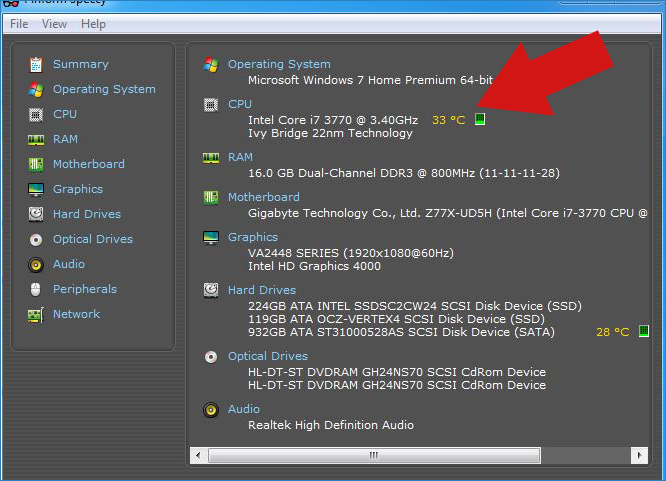
Once Speccy is installed and loaded you will see the core temperature which tells you how hot the CPU is.
Now I’m not going to go into technical terms here regarding CPU overclocking or throttle limitations. Instead I am going to break down some temperatures that are regarded fine for a home computer.
0 – 50c : Great – Your computer is running just fine at a safe temperature. Check again in a few months by running Speccy again to make sure no dust has been allowed to build up.
50c – 65c: Don’t panic it’s OK. Your processor is hot but no harm should come to the system at this temperature. Use a can of compressed air to clear the vents or fan blades of excess dust.
65c – 85c: Your computer is overheating. You may experience the system hanging up (Not Responding) or even crashing and restarting. It is running much slower than it should be. The computer requires immediate maintenance. The fans need to be cleaned.
85c + : Your computer is too hot. There is a high risk of causing permanent damage to the CPU, caps, RAM and other components. Some processors can reach 110c before the capacitors on the board pop. Once this happens, your computer may be beyond economical repair.
How To Get The Temperature Down…
Use compressed air to blow dust from the fans. Thermal paste can be applied to the processor and graphics chips.
Do Not Open Your Computer Within Warranty Period. If your computer is less than 12 months old, opening the casing will void the warranty. This applies to all laptops and desktops from any manufacturer. This also applies to desktops built by us.
If you are not familiar with working inside computers – we can service this for you. A service or basic repair in the shop costs £30.00. (£25 + VAT)
(If bringing your laptop in for repair please bring the power supply unit (the charger) with you).
NB: (shameless sales plug) Thermal Paste & Compressed Air available in the shop.