
Over the last few weeks we have seen a few cases of Windows keyboard language settings changing to US instead of UK.
The only real difference you’ll notice is that your @ and ” are the wrong way around.
Quick Fix
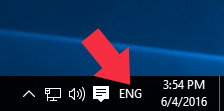 Click on ENG letters at the bottom of your screen next to the clock.
Make sure UK is selected.
Prevent This Happening Again
You could go one step further to remove US completely from your system.
Click the ENG and select Language Preferences

Set UK as default & remove US
Select English (United Kingdom) and Set as default
Next select English (United States) and click Remove
Done.