
FAQ: Is Windows Vista still safe to use?
Post Update Notice: This post was written in June 2014. The advice no longer applies. Vista is “end of life” – it’s time to change.
Since Windows XP was retired in April 2014, I am often asked in the shop whether Windows Vista is still safe to use and if so how long will it be supported.
The quick answer is yes.
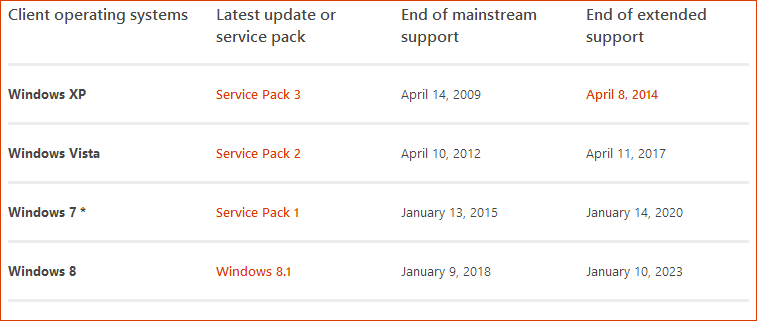
Here is the Microsoft Lifecycle table: (Click on table for more information on Mainstream & Extended Support)
The Longer Answer Is “Make Sure It’s Up-To-Date”.
Here are a couple of quick tips to check you have the latest security updates in your Vista computer.
Tip 1:
Check that you have SP2 installed on your Vista computer.
To do so on your keyboard hold Windows Key (the flag) and press Break.

In the System Properties Window make sure you have Windows Vista Service Pack 2 listed.
Tip 2:
Make sure you have the latest version of Internet Explorer installed. Although new systems use Internet Explorer 11, on Vista the latest version that you can have is IE 9. IE 9 is safe though as it is still supported. As long as you are not using IE 8 or earlier. Those are considered high risk with security flaws.
Use this link from Microsoft (will open in a new window) Click here to find “What version of IE am I using”
Resolve
If you do not have SP2 or IE9 then I recommend running Windows Updates repeatedly until the system is up to date.
Running a computer on the internet without the latest updates, especially an old computer, means that your information is not secure and you run the risk of attack from Malware.
But YES. Windows Vista is safe and secure to operate (as long as it has the latest updates as mentioned).
Footnote: Internet Explorer 9 will not install until you have installed Service Pack 2.